Digital Design Revolution: How 3D Builders & Customization Tools Make Designing Your Structure Simple
 Published On:
 Designing a building was once a complicated process. Often, you had to rely on rough drawings and long discussions with your friends and family about the structure’s look. Sometimes, it used to take months to imagine and finalize the structure. But now you don’t have to use the same old ways to install a steel structure. It is because things have changed now.
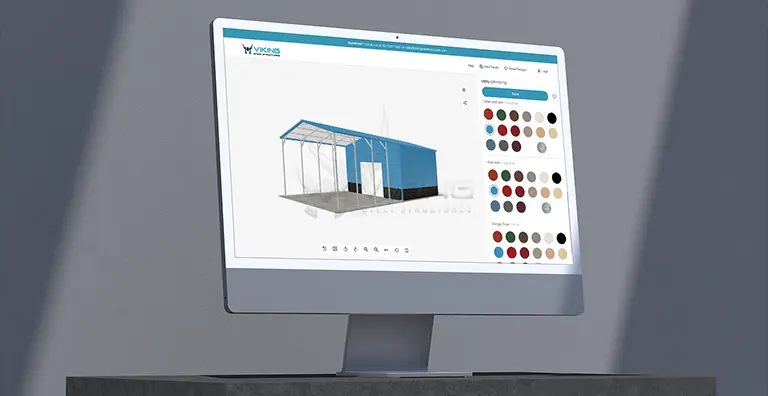
Digital tools like the 3D estimators help you customize the structure and visualize it virtually, before finalizing anything. These tools make the process easier, faster, and more accurate. Even someone with no technical background can now design a structure with confidence. We have elaborated on everything: how the digital design revolution works and why it makes structural planning simple and stress-free.
The Rise of Digital Design in Structure Planning
Digital design tools didn’t appear overnight. They grew out of a need to solve real problems faced by builders and customers. Earlier, most structures were designed using flat drawings. These drawings showed measurements but failed to show depth, height, or real-life appearance. For many people, it was hard to imagine how everything would come together.
Changes were also expensive. If you wanted to move a door or adjust the roof after planning, it often meant redoing the drawings and increasing the budget. This made the entire process slow and frustrating. Because of these issues, people wanted a better way to design before construction started.
How Digital Tools Changed the Process:
Digital tools replaced guesswork with clarity. Instead of imagining the structure, users could now see it on their screens. Changes could be made instantly, and results were visible in real time.
This shift reduced mistakes and helped people feel more confident about their decisions.
Naturally, this led to the rise of 3D builders. Since digital planning has become common nowadays, most people want to understand how a 3D builder works. Let’s know it in the space below.
What Is a 3D Builder and How Does It Work?
A 3D builder is an online tool that allows users to design structures visually. It turns ideas into realistic models that can be viewed from every angle.
Understanding the Basics of a 3D Builder
A 3D builder lets you choose the size, layout, and features of your structure. As you make selections, the tool updates the model instantly. You don’t need special training or design skills.
The interface is usually simple. You click, adjust, and see results immediately. This makes design accessible to everyone, not just professionals. Once users understand the basics, the real power of these tools becomes clear through their features.
Key Features That Simplify Design
Some features are crucial for designing a metal structure. Without these features, you might find a tool not so cool. Real-time visualization is one of the biggest benefits of seeing in a 3D estimator. It helps you virtually notice the structure of construction. If you add a door or change the roof style, the model updates instantly. This reduces confusion and prevents surprises later.
Component Selection and Layout
Users can select different parts, such as walls, doors, windows, and roofs. Some websites also show a component visualizer, which helps you clearly display each part, so you understand how each element fits into the overall structure. With visualization handled, customization becomes the next natural step.
Customization Tools That Put You in Control
Customization tools allow users to design structures that meet their exact needs rather than settle for standard options. You can decide on the size, roof, steel-frame thickness, windows, and many other details.
Choose the Right Size and Layout
Every structure serves a purpose. Some are used for storage, while others are used for workshops, garages, or commercial needs. Custom tools allow you to select dimensions that fit your use case perfectly.
For example, many people choose a 30×60 metal building because it offers enough space for vehicles, equipment, or business operations without feeling cramped. Once size and layout are clear, structural decisions follow naturally.
Select the Right Foundation Type
The foundation supports the entire structure, so choosing the correct foundation type is essential. Digital tools explain each option clearly and show how it affects stability and durability.
By seeing how the structure sits on its foundation, users can make informed decisions based on climate, soil, and usage. With the structural basics decided, the focus shifts to preventing mistakes before construction begins.
How Customization Tools Reduce Costly Mistakes
Mistakes during construction are expensive and stressful. Digital design tools help avoid these problems early. When you can see the full design in advance, it’s easier to spot issues. Maybe a door placement doesn’t make sense, or the height feels too low. These problems can be fixed instantly without extra cost. Moreover, this saves time and avoids regret after construction begins.
Once errors are reduced, planning installation becomes much smoother. Digital tools often align better if you have gone through the steel structure installation guide. It helps users understand what happens during construction. This makes communication with builders easier and ensures everyone is on the same page. With planning complete, many users begin to consider modifying existing structures rather than building new ones.
How to Design a Structure with a 3D Builder
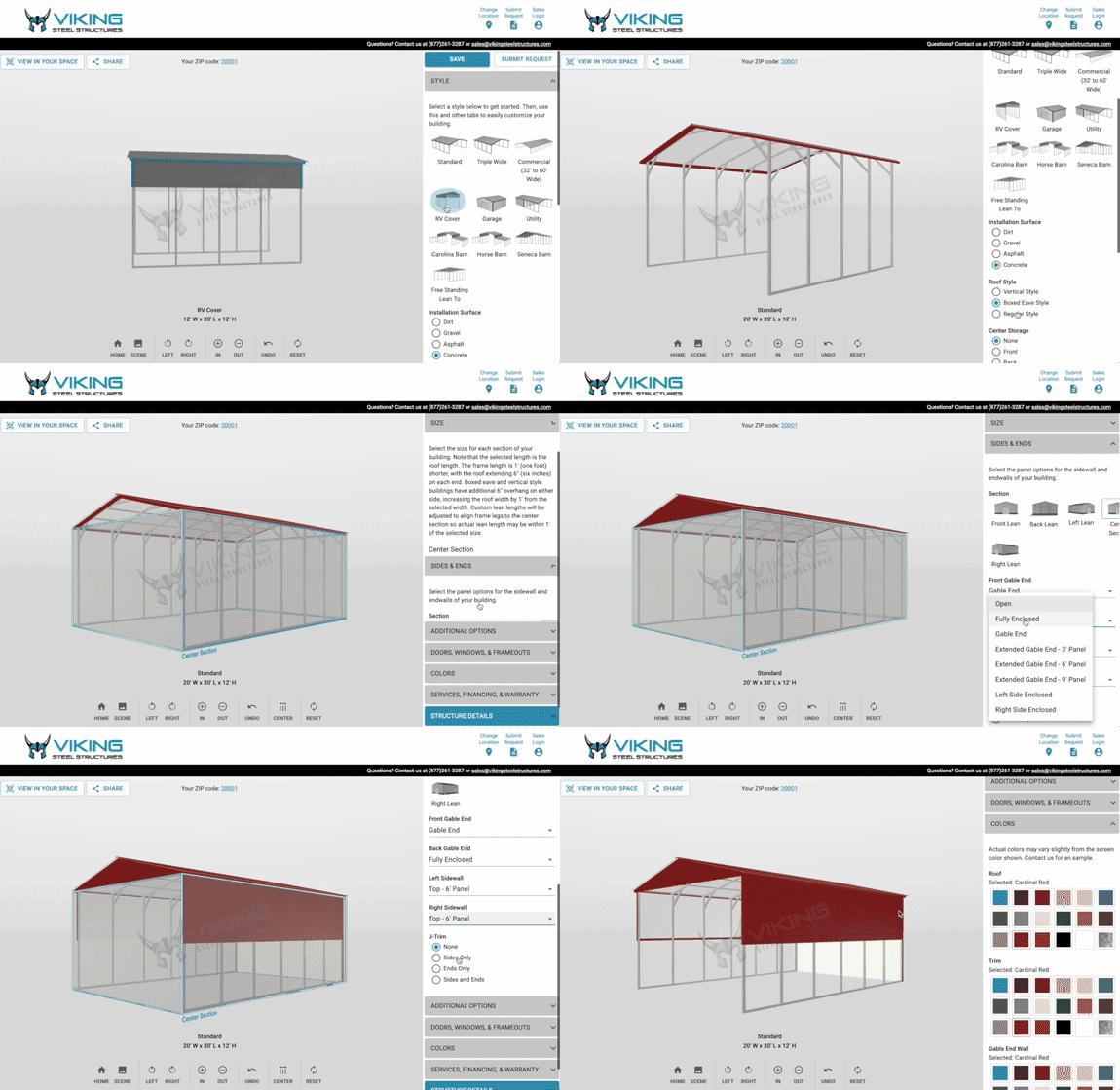
Designing a structure with a 3D builder is much easier than most people think. You don’t need technical skills or construction experience. The tool guides you step by step and shows every change in real time, so you always know what you are doing. Below is a clear breakdown of how the process usually works.
Note: The sequence of steps by various steel building contractors can differ, but most steps remain the same.
Step 1: Start with the Purpose of Your Structure
Before opening the 3D designer, you should be clear about why you need the structure. Is it for storage, parking, a workshop, or business use? When you select the structure type in the tool, it often suggests suitable sizes and layouts. This helps you avoid designing something that looks good but doesn’t work in real life. Once the purpose is clear, the next step is choosing the right size.
Step 2: Select the Size and Dimensions
In the 3D builder, you can enter the length, width, and height of your structure. As you adjust these numbers, the model updates instantly on the screen. This visual feedback helps you better understand space. You can see if vehicles fit properly or if there’s enough room to move around. If something feels off, you can change it immediately without any cost. After selecting a size, it’s time to build a strong base.
Step 3: Choose the Foundation
The foundation supports the entire structure, so this step is important. The 3D builder shows different foundation options and explains where each one works best. As you select a foundation, the tool visually places the structure on it. This helps you see how stable and practical your choice is. It also helps you plan site preparation in advance.
With the foundation ready, the structure itself comes next.
Step 4: Customize Walls, Roof, and Structure Style
Now you can choose wall height, roof style, and overall structure shape. The 3D estimator lets you switch between options like vertical or horizontal panels and different roof angles.
Each change appears instantly, making it easier to compare designs. You can rotate the structure and view it from different angles to ensure it matches your needs and surroundings.
Once the structure looks right, details make it functional.
Step 5: Add Doors, Windows, and Openings
Doors and windows are added by clicking and placing them where you want. The tool shows exact placement and spacing, helping you avoid awkward layouts. You can test different door sizes for vehicles or equipment and see how windows affect light and ventilation. This step makes the design practical, not just attractive. After functionality is set, it’s time to refine the design.
Step 6: Adjust Colors and Finishing Touches
Most 3D builders for steel buildings let you change the colors of walls, roofs, and trims. This helps you match the structure with nearby buildings or personal preferences. Seeing color combinations in real time prevents regret later. You can experiment freely until the structure feels right. Once the design is complete, you should review it carefully.
Step 7: Review, Rotate, and Finalize the Design
Before finalizing, rotate the structure and view it from all angles. Check spacing, door access, and overall balance. Many tools also provide a summary of your design, including dimensions and features. This makes it easier to share the design with builders or suppliers.
Step 8: Save, Share, or Move to Construction
Once you are satisfied with the building look, you can save the design or share it digitally. Some platforms connect the design directly to pricing or construction planning, making the next steps simple. This smooth transition from idea to execution is what makes the 3D design tool for prefab buildings so powerful.
Designing for Climate, Comfort, and Longevity
Weather plays a major role in how a structure performs over time. Wrong selection of steel thickness, ventilation, and even the roof can weaken your space. Then you might not be able to get the most out of it.
Digital tools help users choose roofing styles, wall thickness, and insulation options based on local weather. This ensures the structure performs well throughout the year. Climate-aware design increases comfort and reduces maintenance issues.
Why Certain Designs Are Best for Winters
In colder regions, structures must handle snow loads and strong winds. Digital tools help you plan designs that are best for winter. It allows users to visualize roof angles and material strength. This results in safer and longer-lasting structures. Moreover, you can use the tool for planning a structure for warm regions. As tools become more advanced, ease of use becomes just as important as features.
The Future of Structure Design Is Digital
Digital tools are no longer optional. They are becoming the standard for designing structures.
People want structures that fit their needs exactly. Digital tools support this demand by making customization easy and affordable. When users know what they are getting, satisfaction increases. There are fewer surprises, better planning, and smoother construction experiences. This is why digital builders are not just tools; they are confidence boosters. But finding the best tool is not easy; choose the right metal building dealer who offers an intuitive tool.
So, Build It Right Before You Build It
Designing a structure no longer has to feel confusing or risky. With modern 3D estimators, you can see every detail clearly, make changes instantly, and feel confident before construction even begins. This digital-first approach saves time, avoids costly mistakes, and gives you full control over your design.
A trusted steel building dealer like Viking Steel Structures takes this experience a step further with its easy-to-use 3D design tool. The tool allows you to customize your building, visualize it in real time, and understand your options clearly, without any pressure or technical hassle. You can design at your own pace and make decisions that truly fit your needs. You can call their team at 877-801-3263 and ask any questions you have before placing the final order. With them, you don’t just design better, you build smarter.
Looking for a metal building that fits your needs?